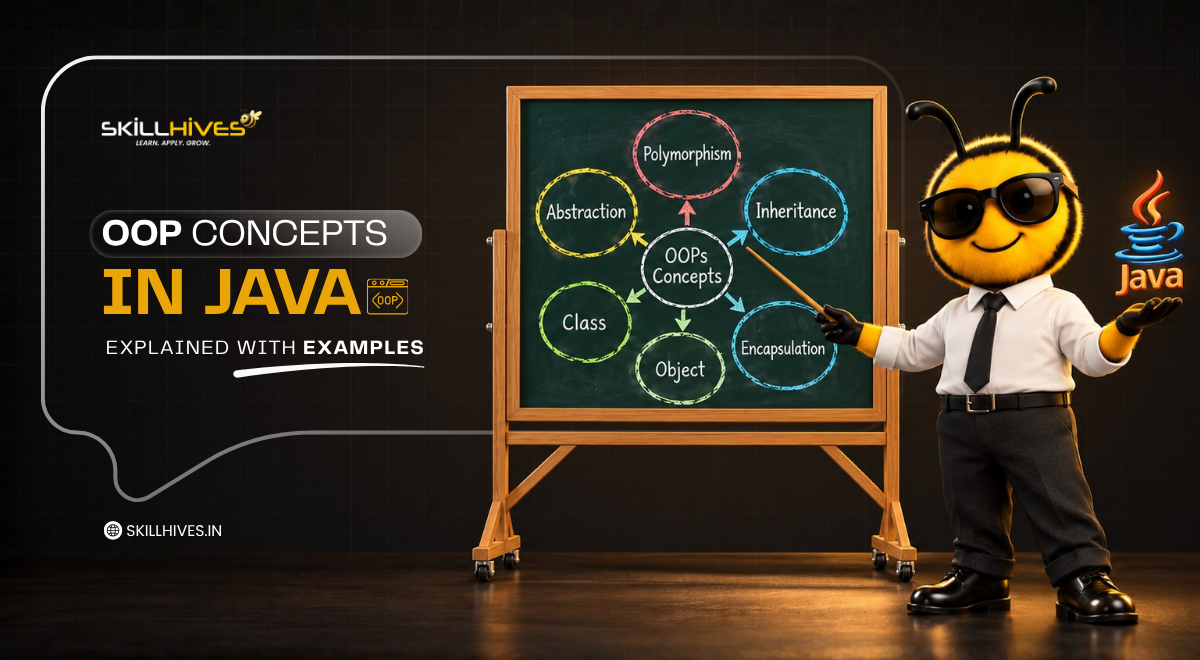
OOP Concepts in Java Explained with Examples
-
By Devraj
-
28th October 2026
Mastering object-oriented programming is a critical stepping stone for anyone pursuing professional web development training or preparing for technical roles, where Java interview questions frequently focus on core principles. At its core, Java object-oriented programming comes down to four fundamental pillars: encapsulation, inheritance, polymorphism, and abstraction. These powerful concepts sit securely on top of two essential building blocks—classes and objects—which form the foundation of scalable application architecture. Whether you are building robust back-end services, enterprise applications, or dynamic web platforms, understanding how these principles interact is vital for writing clean, maintainable, and reusable code.
This comprehensive beginner-friendly guide explains each concept in plain, accessible words, accompanied by fully runnable Java code, real console output, and practical real-world examples to bridge the gap between theory and hands-on coding practice.
Master Java OOP from Scratch
Unlock your potential with our expert-led web development training and hands-on coding labs.
Table of Content
The four pillars of OOP in Java at a glance
Association, aggregation and composition in Java
Real world examples of OOP in Java
Java OOP interview questions and answers
OOP in Java: 5 most asked FAQs
What is OOP in Java?
OOP stands for object-oriented programming. It is a way of writing programs around objects, which bundle data (fields) and actions (methods) in one place, instead of around loose functions. Java is built on this idea: almost all the code you write lives inside a class.
If you are searching for OOP concepts in Java for beginners, start here. Every other idea in this guide, from inheritance to interfaces, is a tool for organising objects.
| Factor | Procedural programming | Object-oriented programming in Java |
|---|---|---|
| Main focus | Steps and functions | Objects that hold data and behavior |
| Data safety | Data is often shared by all functions | Data can be hidden inside a class |
| Code reuse | Copy or call the same functions | Inheritance, composition and interfaces |
| Large projects | Gets hard to manage | Classes keep code organised |
| Typical language | C | Java, C#, Python |
Why Java uses OOP
- Clear structure: each class has one job, so you know where to look.
- Less repetition: shared code lives in one place (the DRY idea, “don’t repeat yourself”).
- Easier changes: you can fix or extend one class without rewriting the whole program.
- Teamwork: different people can build different classes at the same time.
The basic OOP concepts in Java (also written OOPs concepts in Java) fall into three groups. The building blocks are class and object. The four pillars of OOP in Java are encapsulation, inheritance, polymorphism and abstraction. The relationships between objects are association, aggregation and composition.
Class and object in Java
A class is a blueprint. An object is a real thing built from that blueprint. Think of a house plan (the class) and the actual houses built from it (the objects). One class can create as many objects as you need.
| Real world | Class | Objects |
|---|---|---|
| Cars | Car | BMW, Audi, Toyota |
| Dogs | Dog | Tommy, Bruno |
| Bank customers | Account | Riya’s account, Kabir’s account |
Every object has three parts:
- State: its data, such as brand and color (stored in fields).
- Behavior: what it can do, such as accelerate (written as methods).
- Identity: its own place in memory, so two cars with the same color are still two different objects.
Class and object in Java: example with output
class Car {
String brand;
String color;
int speed;
Car(String brand, String color) { // constructor
this.brand = brand;
this.color = color;
this.speed = 0;
}
void accelerate(int amount) {
speed += amount;
}
void showStatus() {
System.out.println(color + ” ” + brand + ” is running at ” + speed + ” km/h”);
}
}
public class Main {
public static void main(String[] args) {
Car car1 = new Car(“BMW”, “Black”);
Car car2 = new Car(“Audi”, “White”);
car1.accelerate(60);
car2.accelerate(40);
car1.showStatus();
car2.showStatus();
}
}
Output:
Black BMW is running at 60 km/h
White Audi is running at 40 km/h
The new keyword creates each object. The constructor, a special method with the same name as the class and no return type, sets up its starting state. Each car keeps its own speed, so accelerating car1 does not change car2.
The four pillars of OOP in Java at a glance
The four pillars of OOP in Java are encapsulation, inheritance, polymorphism and abstraction. This table is the quick version of the OOP principles in Java with examples. Each pillar gets its own section with code below.
| Pillar | What it means | Real-world example | How Java does it |
|---|---|---|---|
| Encapsulation | Hide data inside a class and control access to it | An ATM: you cannot touch the cash directly | private fields with public getters and setters |
| Inheritance | A class reuses the fields and methods of another | A child inherits traits from parents | extends keyword |
| Polymorphism | One action, many forms | The same “pay” button works for UPI or card | Method overloading and overriding |
| Abstraction | Show what an object does, hide how | A car dashboard hides the engine | abstract classes and interfaces |
A memory trick: the pillars spell A PIE: Abstraction, Polymorphism, Inheritance, Encapsulation.
Encapsulation in Java
Encapsulation means wrapping data and the methods that use it into one class, then hiding the data from the outside. Other code can only reach it through methods you choose to expose. Like a medicine capsule, the contents stay protected inside.
How to achieve encapsulation in Java
- Declare the fields private.
- Provide public getter methods to read them.
- Provide public setter methods (or other methods like deposit) that check the value before changing it.
Encapsulation in Java with example
A bank balance should never be changed by random code. Here the balance is private, and the only way to change it is through methods that enforce the rules.
class BankAccount {
private String owner;
private double balance;
public BankAccount(String owner, double openingBalance) {
this.owner = owner;
this.balance = openingBalance;
}
public double getBalance() {
return balance;
}
public void deposit(double amount) {
if (amount <= 0) { System.out.println(“Deposit must be positive.”); return; } balance += amount; } public void withdraw(double amount) { if (amount > balance) {
System.out.println(“Insufficient balance.”);
return;
}
balance -= amount;
}
}
public class Main {
public static void main(String[] args) {
BankAccount account = new BankAccount(“Riya”, 5000);
account.deposit(1500);
account.withdraw(8000); // rejected: more than the balance
account.withdraw(2000);
System.out.println(“Balance: ” + account.getBalance());
}
}
Output:
Insufficient balance.
Balance: 4500.0
If balance were public, any class could write account.balance = -999999 and break the rules. Making it private forces every change through deposit and withdraw.
Why encapsulation matters
- It protects data from accidental or unauthorized changes.
- You can change the inside of a class later without breaking the code that uses it.
- You can make a field read-only by providing a getter but no setter.
Inheritance in Java
Inheritance lets one class acquire the fields and methods of another using the extends keyword. It models an “is-a” relationship: an ElectricCar is a Car, and a Car is a Vehicle. The class being inherited from is the superclass (parent). The class that inherits is the subclass (child).
The benefit is reuse. You write start() once in Vehicle, and every subclass gets it for free.
Inheritance in Java with example
class Vehicle {
String brand;
Vehicle(String brand) {
this.brand = brand;
}
void start() {
System.out.println(brand + ” is starting”);
}
}
// Single inheritance: Car extends Vehicle
class Car extends Vehicle {
Car(String brand) {
super(brand);
}
void openBoot() {
System.out.println(brand + ” boot is open”);
}
}
// Multilevel inheritance: ElectricCar extends Car extends Vehicle
class ElectricCar extends Car {
ElectricCar(String brand) {
super(brand);
}
void charge() {
System.out.println(brand + ” is charging”);
}
}
// Hierarchical inheritance: Bike also extends Vehicle
class Bike extends Vehicle {
Bike(String brand) {
super(brand);
}
void kickStart() {
System.out.println(brand + ” bike kick-started”);
}
}
public class Main {
public static void main(String[] args) {
ElectricCar tesla = new ElectricCar(“Tesla”);
tesla.start(); // from Vehicle
tesla.openBoot(); // from Car
tesla.charge(); // its own method
Bike bike = new Bike(“Royal Enfield”);
bike.start(); // from Vehicle
bike.kickStart();
}
}
Output:
Tesla is starting
Tesla boot is open
Tesla is charging
Royal Enfield is starting
Royal Enfield bike kick-started
The super(brand) call passes the value up to the parent constructor. ElectricCar never defines start() or openBoot(), yet it can call both.
Types of inheritance in Java
| Type | Shape | Supported with classes? | In the example above |
|---|---|---|---|
| Single | One child, one parent | Yes | Car extends Vehicle |
| Multilevel | A chain: grandparent, parent, child | Yes | ElectricCar extends Car extends Vehicle |
| Hierarchical | Several children share one parent | Yes | Car and Bike both extend Vehicle |
| Multiple | One child, two or more parents | No, use interfaces | Not allowed with extends |
| Hybrid | A mix of the types above | Only through interfaces | Not allowed with classes alone |
Why Java blocks multiple inheritance with classes. If two parents define the same method, the child cannot tell which one to use. This is the diamond problem. Java avoids it by allowing one parent class but any number of interfaces.
Polymorphism in Java
Polymorphism means “many forms”. The same method name can behave differently depending on the situation. A “pay” button in a shopping app is one action, but it works differently for UPI, a card or net banking.
Types of polymorphism in Java with examples
Polymorphism in Java with example code comes in two types: compile-time polymorphism (method overloading) and runtime polymorphism (method overriding).
1. Compile-time polymorphism: method overloading
Overloading means several methods in the same class share one name but take different parameters. The compiler picks the right one before the program runs.
class Calculator {
int add(int a, int b) {
return a + b;
}
double add(double a, double b) {
return a + b;
}
int add(int a, int b, int c) {
return a + b + c;
}
}
public class Main {
public static void main(String[] args) {
Calculator calc = new Calculator();
System.out.println(calc.add(2, 3));
System.out.println(calc.add(2.5, 3.5));
System.out.println(calc.add(1, 2, 3));
}
}
Output:
5
6.0
6
2. Runtime polymorphism: method overriding
Overriding means a subclass gives its own version of a method it inherited. Java decides which version to run while the program is running, based on the actual object, not the variable type.
class Payment {
void pay(double amount) {
System.out.println(“Paying ” + amount + ” using generic payment”);
}
}
class UpiPayment extends Payment {
@Override
void pay(double amount) {
System.out.println(“Paying ” + amount + ” using UPI”);
}
}
class CardPayment extends Payment {
@Override
void pay(double amount) {
System.out.println(“Paying ” + amount + ” using credit card”);
}
}
public class Main {
public static void main(String[] args) {
Payment p1 = new UpiPayment();
Payment p2 = new CardPayment();
p1.pay(499.0); // decided at runtime
p2.pay(1299.0);
}
}
Output:
Paying 499.0 using UPI
Paying 1299.0 using credit card
Both variables have the type Payment, yet each call runs the subclass version. This is what lets you write one loop over a list of Payment objects and never worry about which kind each one is. The @Override annotation asks the compiler to check that you really are overriding something, which catches typos.
Method overloading vs overriding in Java
| Factor | Method overloading | Method overriding |
|---|---|---|
| Also called | Compile-time (static) polymorphism | Runtime (dynamic) polymorphism |
| Where | Inside the same class | Between a parent and a child class |
| Method name | Same | Same |
| Parameters | Must differ in number, type or order | Must be the same |
| Inheritance needed | No | Yes |
| Decided by | The compiler, from the arguments | The JVM, from the actual object |
| Example above | Calculator.add(...) |
UpiPayment.pay(...) |
One common trap: changing only the return type is not overloading. The compiler rejects it.
Abstraction in Java
Abstraction means showing only what an object does and hiding how it does it. When you tap “Pay” in a payments app, you see one button. You do not see the network calls, encryption or bank checks behind it.
Java gives you two tools for abstraction: abstract classes (partial abstraction) and interfaces (full abstraction of behavior). You cannot create an object directly from either one. A concrete class has to fill in the details.
Abstraction in Java with example
interface Refundable {
void refund(double amount);
}
abstract class PaymentMethod {
protected String name;
PaymentMethod(String name) {
this.name = name;
}
abstract void pay(double amount); // no body: subclasses must define it
void printReceipt(double amount) { // shared, ready-made behaviour
System.out.println(“Receipt: ” + amount + ” paid via ” + name);
}
}
class Upi extends PaymentMethod implements Refundable {
Upi() {
super(“UPI”);
}
void pay(double amount) {
System.out.println(“Sending ” + amount + ” through UPI”);
}
public void refund(double amount) {
System.out.println(“Refunding ” + amount + ” to the UPI account”);
}
}
public class Main {
public static void main(String[] args) {
Upi upi = new Upi();
upi.pay(750.0);
upi.printReceipt(750.0);
upi.refund(250.0);
}
}
Output:
Sending 750.0 through UPI
Receipt: 750.0 paid via UPI
Refunding 250.0 to the UPI account
PaymentMethod is an abstract class. It promises that every payment method can pay, and it shares a ready-made printReceipt. Refundable is an interface: a pure contract that any class can sign, whatever its parent. Upi extends one class and implements an interface.
Abstract class vs interface in Java
| Factor | Abstract class | Interface |
|---|---|---|
| Keyword | abstract class |
interface |
| Used with | extends |
implements |
| Methods | Abstract and normal methods | Abstract, default and static methods |
| Fields | Any kind, including instance fields | Only public static final constants |
| Constructors | Yes | No |
| How many can a class use | Only one | As many as you like |
| Best for | Related classes that share code and state | A capability that unrelated classes can share |
Rule of thumb: pick an abstract class when classes are the same kind of thing and share code. Pick an interface when you are describing something a class can do.
Encapsulation vs abstraction in Java
Beginners mix these two up because both involve hiding. The difference is the purpose.
| Factor | Encapsulation | Abstraction |
|---|---|---|
| Core idea | Protect data by hiding it inside a class | Hide complexity by exposing only what matters |
| Solves | Unsafe, uncontrolled access to data | Too much detail for the user of a class |
| Works at | Implementation level (how data is stored) | Design level (what the class offers) |
| Achieved with | private fields, getters and setters |
Abstract classes and interfaces |
| Example | BankAccount keeps balance private |
PaymentMethod exposes only pay |
In short: encapsulation is about hiding data, abstraction is about hiding complexity.
Association, aggregation and composition in Java
These three describe how objects relate to each other. They are not pillars, but interviewers ask about them often, and they decide how you design real systems. Think of them as three levels of “how tightly are these two objects tied together?”
- Association: two objects know and use each other. Neither owns the other. A doctor treats a patient.
- Aggregation: a “has-a” relationship where the part can live on its own. A department has employees, but employees exist even if the department is closed.
- Composition: a “part-of” relationship where the part cannot live without the whole. A hotel has rooms, and if the hotel is demolished, the rooms go with it.
Association, aggregation and composition in Java: example
import java.util.ArrayList;
import java.util.List;
class Employee {
String name;
Employee(String name) { this.name = name; }
}
// Aggregation: Department HAS employees, but employees exist without it
class Department {
String title;
List employees = new ArrayList<>();
Department(String title) { this.title = title; }
void add(Employee e) { employees.add(e); }
}
class Room {
int number;
Room(int number) { this.number = number; }
}
// Composition: Hotel creates and owns its Rooms
class Hotel {
String name;
private final List rooms = new ArrayList<>();
Hotel(String name, int roomCount) {
this.name = name;
for (int i = 1; i <= roomCount; i++) {
rooms.add(new Room(100 + i));
}
}
int roomCount() { return rooms.size(); }
}
// Association: Doctor and Patient know each other, neither owns the other
class Doctor {
String name;
Doctor(String name) { this.name = name; }
void treat(Patient p) {
System.out.println(“Dr. ” + name + ” is treating ” + p.name);
}
}
class Patient {
String name;
Patient(String name) { this.name = name; }
}
public class Main {
public static void main(String[] args) {
Employee asha = new Employee(“Asha”);
Department it = new Department(“IT”);
it.add(asha);
it = null; // department gone
System.out.println(asha.name + ” still exists”);
Hotel hotel = new Hotel(“Sea View”, 3);
System.out.println(hotel.name + ” owns ” + hotel.roomCount() + ” rooms”);
new Doctor(“Mehta”).treat(new Patient(“Kabir”));
}
}
Output:
Asha still exists
Sea View owns 3 rooms
Dr. Mehta is treating Kabir
| Association | Aggregation | Composition | |
|---|---|---|---|
| Relationship | Uses / knows | Has-a (weak) | Part-of (strong) |
| Ownership | None | Shared, not owned | The whole owns the part |
| Lifecycle | Independent | Independent | Part dies with the whole |
| Real-world example | Doctor and patient | Department and employees | Hotel and rooms |
| In code | A method receives or holds a reference | A field holds objects created elsewhere | The class creates the part itself |
A useful design habit is to prefer composition over inheritance when you only need to reuse behavior. It keeps classes loosely coupled.
Real world examples of OOP in Java
Here is one Java OOP program with output that uses all four pillars together: a small shopping cart. Look for each pillar as you read.
import java.util.ArrayList;
import java.util.List;
interface Discountable {
double discountedPrice();
}
abstract class Product implements Discountable {
private final String name; // encapsulation
private final double price;
Product(String name, double price) {
this.name = name;
this.price = price;
}
public String getName() { return name; }
protected double getPrice() { return price; }
}
class Book extends Product { // inheritance
Book(String name, double price) { super(name, price); }
@Override
public double discountedPrice() {
return getPrice() * 0.90; // 10% off
}
}
class Laptop extends Product {
Laptop(String name, double price) { super(name, price); }
@Override
public double discountedPrice() {
return getPrice() * 0.95; // 5% off
}
}
class Cart {
private final List items = new ArrayList<>();
void add(Product p) { items.add(p); }
double total() {
double sum = 0;
for (Product p : items) {
sum += p.discountedPrice(); // polymorphism
}
return sum;
}
void printBill() {
for (Product p : items) {
System.out.println(p.getName() + ” -> ” + p.discountedPrice());
}
System.out.println(“Total: ” + total());
}
}
public class Main {
public static void main(String[] args) {
Cart cart = new Cart();
cart.add(new Book(“Clean Code”, 1000));
cart.add(new Laptop(“ThinkPad”, 60000));
cart.printBill();
}
}
Output:
Clean Code -> 900.0
ThinkPad -> 57000.0
Total: 57900.0
| Pillar | Where it shows up |
|---|---|
| Encapsulation | name and price are private; other classes use getName() and getPrice() |
| Abstraction | Product and Discountable define what a product must offer, not how |
| Inheritance | Book and Laptop extend Product and reuse its fields |
| Polymorphism | Cart calls discountedPrice() on each Product without knowing if it is a book or a laptop |
The payoff: to add a Phone class with a 7% discount, you write one new class. Cart does not change at all.
OOP concepts in Java with real time examples
| System | Classes you would write | Concepts at work |
|---|---|---|
| Online shopping | Product, Cart, Order, Customer |
Inheritance, polymorphism, composition |
| Banking app | Account, SavingsAccount, Transaction |
Encapsulation, inheritance |
| Cab booking | Ride, Auto, Sedan, Driver |
Polymorphism (fare per ride type), association |
| Library system | Book, Member, Library |
Aggregation, association |
| Food delivery | Restaurant, MenuItem, Order |
Composition, abstraction |
Advantages of OOP in Java
| Advantage | What it means in practice |
|---|---|
| Reusability | Write a class once, reuse it through inheritance or composition |
| Maintainability | A change stays inside one class instead of spreading through the program |
| Security | Encapsulation keeps data behind rules you control |
| Flexibility | Polymorphism lets you add new types without editing existing code |
| Scalability | Large programs split into small classes that teams build in parallel |
| Real-world modeling | Classes like Order and Customer mirror how the business thinks |
Limits of OOP in Java
OOP is not free. It adds more classes and design work than a small script needs. Deep inheritance chains are hard to follow, and a large number of objects uses more memory than simple procedural code. For a 50-line utility, plain methods are fine. OOP pays off as the program grows.
Java OOP interview questions and answers
These are the Java OOP interview questions that come up most in fresher and junior rounds. Keep each answer short, then offer a code example if the interviewer asks.
- What is the difference between a class and an object? A class is a blueprint. An object is an instance of it, created with new, with its own state.
- What is a constructor? A special method with the class name and no return type that runs when an object is created. Types: default, parameterized and copy.
- Encapsulation vs abstraction? Encapsulation hides data with private fields. Abstraction hides complexity by exposing only essential behavior.
- Method overloading vs overriding? Overloading: same name, different parameters, resolved at compile time. Overriding: a child redefines a parent method, resolved at runtime.
- Abstract class vs interface? An abstract class can hold state and constructors, and a class extends only one. An interface is a contract, and a class can implement many.
- Why no multiple inheritance with classes? To avoid the diamond problem, where a child inherits the same method from two parents. Interfaces are the safe alternative.
- Can you override a static, private or final method? No. Private methods are not inherited, static methods are hidden, and final methods cannot be changed.
- What does super do? It refers to the parent class, to call its constructor or an overridden method.
- Aggregation vs composition? Both are has-a relationships. In aggregation the part can exist alone. In composition it cannot exist without the whole.
- What is dynamic method dispatch? The JVM picks the overridden method at runtime from the actual object type. It is how runtime polymorphism works.
Ace Your Next Tech Interview
Practice real-world Java interview questions and build enterprise-ready skills with confidence.
OOP in Java: 5 most asked FAQs
What are the OOP concepts in Java?
Class and object are the building blocks. The four pillars are encapsulation, inheritance, polymorphism and abstraction. Association, aggregation and composition describe how objects relate.
Is Java 100% object-oriented?
No. Java has primitive types such as int and boolean that are not objects, so it is not purely object-oriented.
What is the difference between OOP and procedural programming?
Procedural code is built from functions that act on shared data. OOP bundles data and methods into objects, which makes large programs easier to organise and protect.
Which OOP concept should a beginner learn first?
Start with class and object, then encapsulation, inheritance, polymorphism and abstraction, in that order.
Where is OOP used in real projects?
Almost everywhere in Java: Spring Boot back ends, Android apps, banking systems and e-commerce platforms are all built from classes and objects.
Why choose Skill Hives to learn Java OOP?
There are multiple reasons to choose Skill Hives to get in depth learning of Java OOP. Some of the prime ones are discussed here:
- Learn by building: Gain practical, hands-on experience by building real-world applications. Learners complete portfolio-worthy projects, including an interactive banking management system (featuring encapsulation and security), an e-commerce shopping cart CLI application (demonstrating polymorphism and interfaces), and a modular vehicle rental system utilizing inheritance and method overriding.
- Support when you are stuck: Never code alone. Benefit from 1-on-1 mentor guidance, live doubt-clearing sessions, and an active peer support community. Our industry experts are available via dedicated chat channels to help you debug errors, explain complex logic, and review your code.
- Interview ready: Prepare for your career with confidence through curated Java interview questions, technical coding assessments, and resume-building workshops. We also offer mock technical interviews and dedicated placement support to help you transition smoothly into software engineering roles.
Conclusion
Object-oriented programming in Java rests on classes and objects, and on four pillars: encapsulation protects data, inheritance reuses code, polymorphism lets one call behave in many ways, and abstraction hides complexity. Association, aggregation, and composition then describe how your objects connect. Mastering these foundational concepts equips you with the architecture and problem-solving mindset needed to build robust, scalable applications and succeed in modern software development.
Ready to Build Scalable Applications?
Join thousands of developers mastering Java object-oriented principles through practical, real-world examples.





Devraj
 28th October 2026